W33 Deposit & Withdrawal Guide For New Players – Make Easy & Safe Transactions
W33 makes it easy for users in Pakistan to deposit and withdraw winnings using trusted options like JazzCash and EasyPaisa. You can start with small deposits to try games and bonuses safely. The process is fast, safe, and clear, with no hidden fees or delays. If you have any problems, customer support is ready to help. Overall, W33 makes it simple and stress-free to play games and earn real money online.
How Do W33 Deposits and Withdrawals Work?
Before playing real money games on W33, you need to know how to deposit and withdraw money. If not, you might:
- Send money to the wrong account
- Enter the wrong payment details
- Wait longer for withdrawals
- Lose bonuses because of missing requirements
Knowing the W33 deposit and withdraw process keeps your money safe and makes playing easier and more fun.
Safety Tips Before Depositing
Before adding money to your W33 account, follow these safety tips:
- Check the Website: Make sure you download the official game app from a trusted sourece like W33.com.pk.
- Use Trusted Payment Methods: Stick to reliable options like JazzCash or EasyPaisa.
- Secure Your Account: Use strong passwords and enable two-factor authentication if available.
- Verify Deposit Limits: Know the minimum and maximum amounts to avoid errors.
- Keep Transaction Records: Take screenshots or save receipts for reference in case of issues.
W33 Deposit Process | Step-by-step Explanation
1. Log In to Your Account
Open the W33 app or website and sign in. If you’re new, complete the registration first. Logging in safely unlocks your wallet for deposits.
2. Go to the Wallet or Deposit Section
Tap the “Wallet,” “Balance,” or “Deposit” icon on the dashboard (usually at the top or bottom). You’ll see your current balance here.
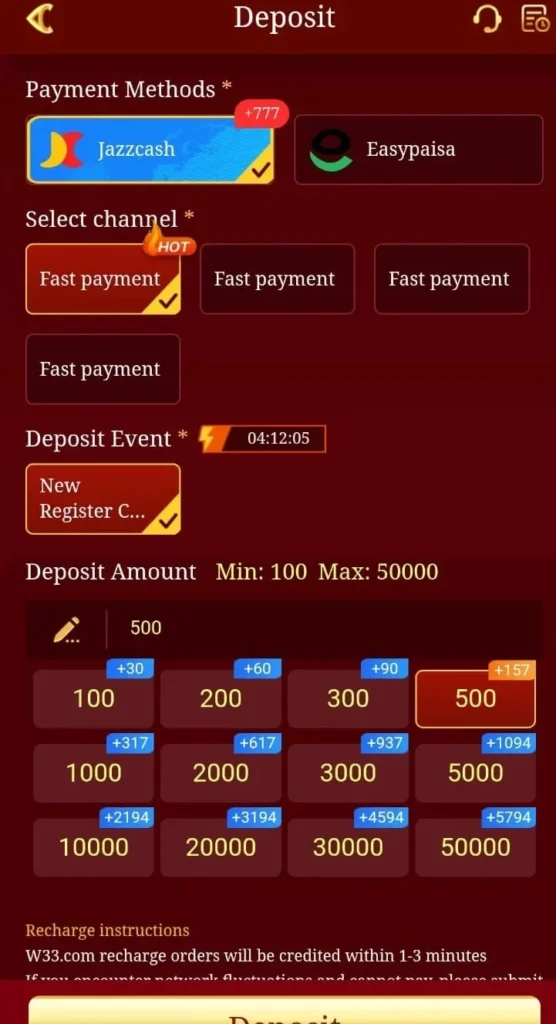
3. Select Your Payment Method
Choose a local payment option like JazzCash or EasyPaisa. These are fast and reliable for Pakistan users. Avoid other methods if you want instant transfers.
4. Enter the Deposit Amount
Type the amount you want to add (minimum Rs. 300–500). Check if there’s a first deposit bonus. The system will show how much you will receive after any bonus.
5. Confirm and Complete Payment
Review your deposit details carefully, then tap “Deposit” or “Proceed.” Follow prompts to open your JazzCash or EasyPaisa app and authorize the payment using your PIN or biometrics.
6. Wait for Confirmation and Claim Bonuses
Funds usually appear instantly in your balance. Refresh the page if needed. If a first deposit bonus applies, activate it to start playing more games right away.
Common Deposit Problems & Solutions
1. Deposit Not Credited
Check your transaction status in JazzCash or EasyPaisa. Refresh your wallet page after 5–10 minutes. If the funds still don’t appear, take a screenshot and contact W33 support.
2. Wrong Amount Added
Always double-check the deposit amount before confirming. If you enter the wrong amount, contact support immediately to correct it.
3. Payment Failed
Ensure your mobile wallet has enough balance and your internet connection is stable. Retry the deposit or try another payment method if it continues to fail.
4. App or Site Glitch
Clear the cache, restart the app or browser, and try again. Switching to Wi-Fi can help if mobile data is unstable.
5. Deposit Limits Exceeded
Check the minimum and maximum deposit limits before making a payment. If your amount is outside the limits, reduce it or split it into multiple deposits.
How to Withdraw Your Earnings from W33 Real Money Game
1. Log In Securely
Access your W33 account via the app or website. Make sure any bonus wagering requirements are completed to avoid withdrawal rejection.
2. Navigate to the Withdrawal Section
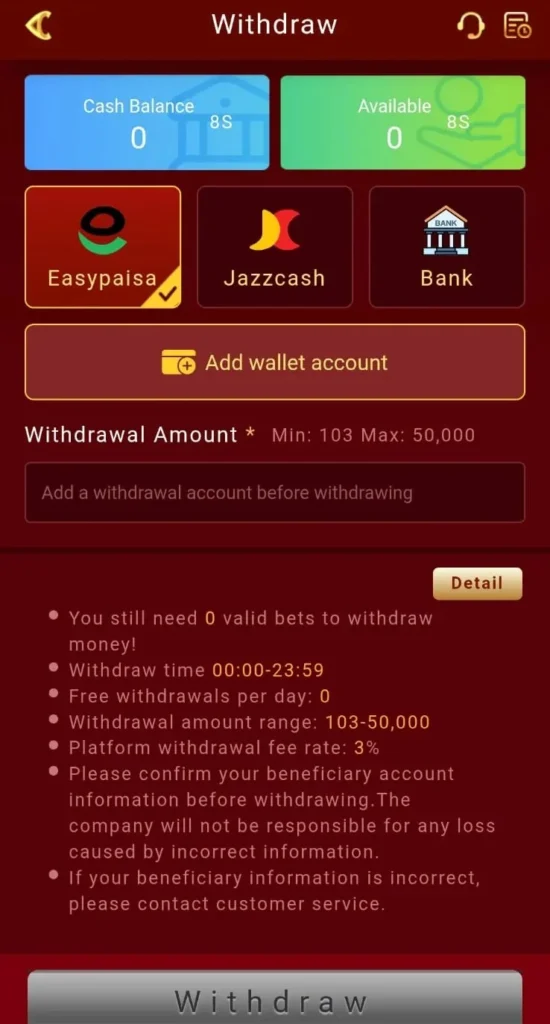
Tap “Withdraw,” “Cash Out,” or “Wallet” from the menu. Your available balance will be shown here.
3. Choose Withdrawal Method
Select JazzCash or EasyPaisa and enter the linked mobile number accurately. These methods ensure fast local payouts.
4. Specify the Amount
Enter how much you want to withdraw, respecting the minimum limit (Rs. 500–1000). Check per-transaction or daily limits. The system will show the eligible amount.
5. Verify Details
Double-check your account number, withdrawal amount, and any required OTP. This ensures security and confirms your ownership of the account.
6. Submit the Request and Track Funds
Tap “Withdraw” or “Confirm” to send your request. You’ll receive a confirmation message. Funds usually arrive in your wallet within minutes to a few hours. Contact support if it takes longer.
How Fast Are W33 Withdrawals?
- W33 withdrawals usually take 5–30 minutes.
- E-wallets are faster, bank transfers take longer.
- First-time withdrawals may be slower because they check your ID or account.
- After the first time, withdrawals are usually quick and easy.
Common Reasons for W33 Withdrawal Delays
1. Account Verification
First-time withdrawals may require ID or document checks, which can take extra time.
2. Payment Method
Bank transfers are slower than e-wallets or instant payment systems.
3. Bonus or Play Requirements
Pending bonus conditions or wagering requirements can delay the payout.
4. Manual Review
Large withdrawals or unusual activity may be reviewed by the platform for security.
How to Avoid W33 Withdrawal Problems
- Verify your account early: Upload your ID and documents before withdrawing.
- Pick fast payment methods: E-wallets are quicker than bank transfers.
- Finish bonus requirements: Complete any bonus or play rules before requesting money.
- Keep your account normal: Avoid unusual activity that may cause delays.
Final Words of W33 Deposit and Withdraw
- Be careful when depositing: Only put in what you plan to use.
- Check your payment info: Make sure your account or card details are correct.
- Know the bonus rules: Read the terms before using any bonus.
- Withdraw after meeting requirements: Finish any play or bonus conditions first.
- Keep proof of transactions: Save receipts or screenshots for safety.
FAQs About W33 Deposit and Withdraw
Yes, deposit limits may apply depending on your account level and verification status.
If your payment method uses a different currency, it will be automatically converted based on current exchange rates and possible provider fees.
No, deposits must be made using payment methods registered in your name for security and compliance reasons.
This depends on the platform policy. Some systems allow multiple pending requests, while others process one at a time.
This may delay or fail your transaction. Always double-check your details before submitting.
Yes, accounts may be temporarily restricted due to suspicious activity, incomplete verification, or policy checks.